Desk
LG UltraFine three-screen setup
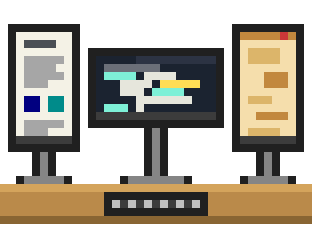
Less a gadget than the way I work. One landscape screen in the middle and a portrait one on each side.
Maker: lg.com
- Screens
- Three LG UltraFine monitors
- Middle
- Landscape, the main working screen
- Left
- Portrait, for long documents and dashboards
- Right
- Portrait, for chats, with a blue light filter on
This is less a gadget than the way I work. Three LG UltraFine screens: one the normal way round in the middle, and one turned on its side at each end.
The middle one is where the work happens. Editor, terminal, browser, whatever I'm actually doing. Nothing else lives there, and that's the point.
The left one is portrait, and it's for anything long: documents, dashboards, logs, a spec I want to keep in view. A tall screen holds a lot of lines, so I read instead of scrolling every few seconds.
The right one is also portrait and it's the chat screen. Discord, Telegram, Slack, and whatever else is pinging. It runs with a blue light filter on, so it's warmer than the other two and the chats look like the side thing they are. I glance across when I want to, and the middle screen stays quiet.
Turning my head is the only cost, and I've stopped noticing.